Changelog

Follow new updates and improvements to Stax.AI.

September 19th, 2026

CX Platform

Signature requests arrive by email, and email gets read on a phone. Until now, the plan sponsor who opened your request on the train had to remember to come back to it at a desk, and the follow-up to make sure they did came out of your day.

The client portal is now built for a phone. A sponsor can open the emailed link, log in or accept an invitation, find the task, draw a signature with their finger, and submit, all without leaving their phone. Documents open fit to the width of the screen with zoom controls and a toolbar you can actually reach, and the dashboard, files, tasks, questionnaires, and settings all reflow instead of demanding a desktop window.

A few steps genuinely need a big screen, including census review, 5500 prep, and playback. Rather than leave someone stuck in a layout that cannot work, those now show a clear screen telling them to open the task on a computer, so the client knows what to do next instead of calling you to ask.

Nothing changes for anyone on a desktop. Above 1024px the portal is identical to what your clients see today.

Projects that start themselves

Most of the work a plan takes on doesn't announce itself. A census file lands in a client folder, a payroll run posts, and the project behind it only begins once someone notices and launches it by hand.

Project templates now launch on their own when the work arrives. You can configure a template to trigger when a file is uploaded into a specific folder or a folder pattern, in either a client directory or a shared directory, so dropping the census in the right place is all it takes to put the project in motion. Payroll can trigger a project the same way, set per company.

Both are configured on the project template, alongside the triggers you already use, and payroll launch is turned on from the company record. Everything downstream behaves exactly as it does today, including the tasks, assignments, and due dates the template already defines.

File short plan years on prior-year forms until the current year's are released

Government forms are rarely available the moment you need them. When a plan year closes ahead of the IRS releasing the updated form, you can now file on the prior year's form in the current year and keep moving. The filing year selector offers the current year, and Stax.ai uses the most recent released form behind it. When the new form is published, filings pick it up automatically.

Report builder upgrades

The report builder picked up a set of capabilities aimed at the questions that take more than one column to answer.

The biggest is filtered measures: a column can now count the records matching its own filter, so a single report can carry projects matching one condition, tasks matching that same condition, and tasks matching a second condition, each as its own distinct count. Alongside that:

  • Rename any column by clicking its chip. The new name carries through to the export, and the underlying aggregation is still shown.

  • Move and sort computed columns, which can now be dragged into position like any other column.

  • Filter on Company Status from the dropdown, including the custom statuses your team configures.

  • Filter on "is not empty", which joins "is empty" as an option.

  • Report on people against companies and plans. The user dataset now joins to both, through new user plan assignment and company assignment datasets.

Lost reasons on deals

When a deal is marked lost or moved to the final stage, Stax.ai now asks why. Lost reason is an optional field, so it never blocks anyone from closing out a deal, and it's available for reporting, which turns a pipeline you can only count into one you can actually learn from.

Ownership on the company page

Company ownership now has its own card on the company page, so ownership structure sits with the rest of the company record instead of in a separate file you have to go find. The card includes a download button, which is useful when ownership needs to travel with a testing package or a document request.

Configurable columns on Companies and Plans

The Companies and Plans tables now let you choose the columns you see, including website, company and plan information, and internal roles. Sorting sticks too: an A-Z selection is saved, so the view you set up is the view you come back to.

Improvements:

  • Bulk email: Sends now carry a default Reply-To address, so when a recipient replies the response reaches the right person.

  • Companies: You can now allow multiple payroll connections on a company, and override the prior service condition where a plan calls for it.

  • Companies and plans: Adding a project or task from the To-do tab now opens the create modal in place, so you can finish the record without leaving the page.

  • Comments: Comments on companies, plans, and similar records can now be deleted or edited by the person who wrote them or removed by an admin.

  • Contacts: Phone numbers now carry an extension field, so a direct line no longer has to be squeezed into the number itself.

  • Custom fields: A file stored in a custom field can now be downloaded directly from the field.

  • Milestones: You can now set a milestone's stage manually, with a confirmation step, and edit milestone dates by hand.

  • Plan data tables: Removing an item now asks for confirmation, so a stray click on the x no longer deletes a field outright.

  • Tables: Joined data can now be expanded onto separate lines from the gear menu, so records that carry several values read one per row.

  • Views: Number fields now format with commas and two decimal places, and a currency type is available with the same formatting.

Fixes:

  • Automations: Corrected an issue where expressions in single-line fields, such as To, CC, output file names, and folder paths, showed their underlying text instead of the field chip.

  • Bulk email: Corrected the targeted-recipient count on a send, which could read higher than the number of people actually addressed.

  • Client portal: Resolved a case where a signing task was marked complete even though the signed document failed to upload.

  • Client portal: Corrected a signing flow that asked for the digital signature attestation twice in one document.

  • Client portal: Resolved an issue where a drawn signature was not placed until the field was selected a second time.

  • Client portal: The Users page under Settings now shows an empty state and an invite button when a client has no portal users yet.

  • Email reminders: Resolved a case where reminders sent with a custom email template included a second copy of the sender's signature.
September 14th, 2026

CX Platform

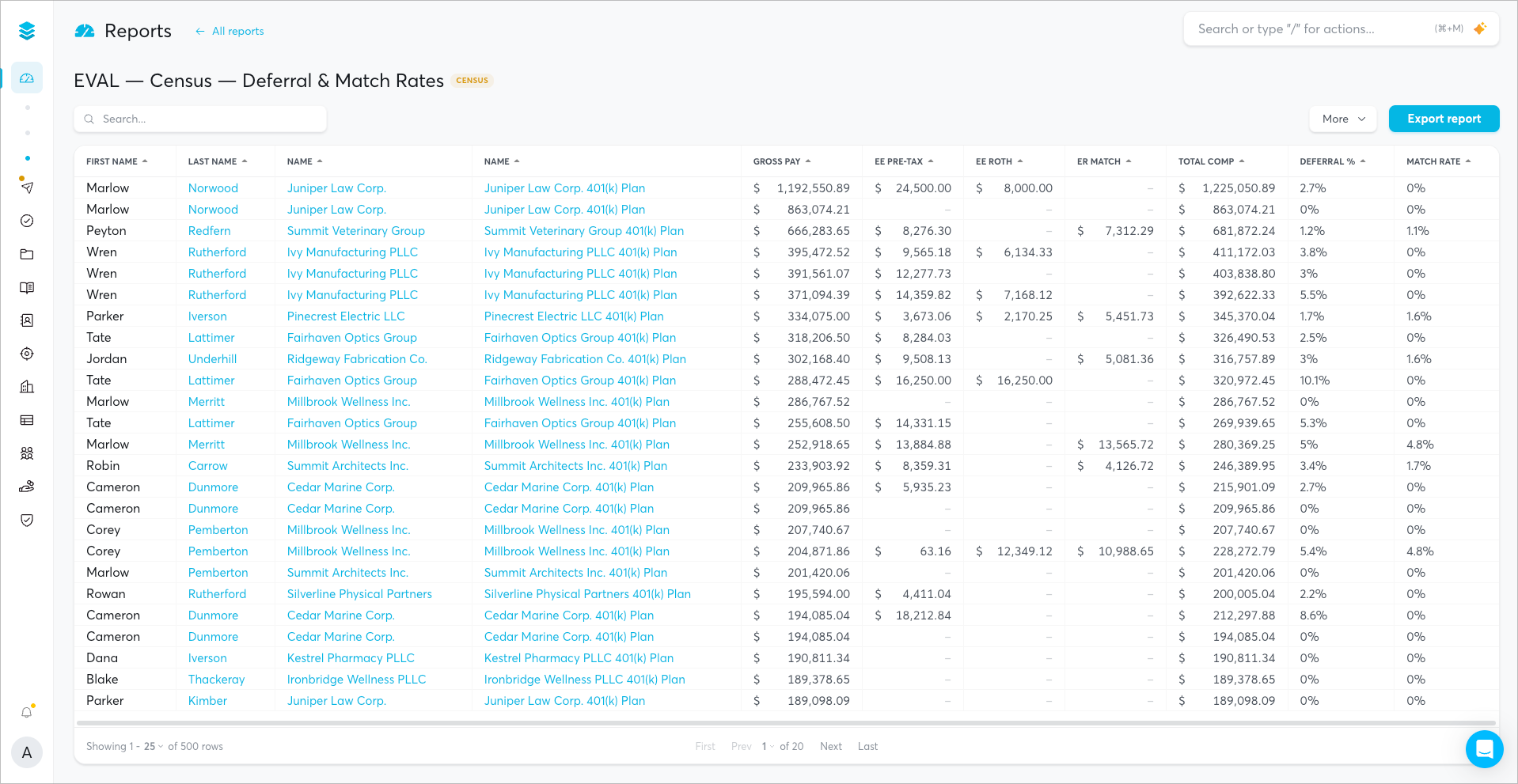
You already know the question. Which clients still have a plan sitting in draft. Which terminating plans owe you a census. Who you need to call before Friday. The work has always been in getting from that question to the answer: choosing the dataset, placing each field, deciding what gets summarized, and only then seeing whether the result tells you what you wanted.

Now you can describe the report instead of assembling it. Open Reports, click Use agent, and say what you want in your own words: "clients with their plans and statuses." The AI Reporting Agent reads the dataset, picks the fields, places them on the right shelves, and builds a working report in front of you.

It stays with you after the first pass. Ask it to add EIN, pull in client state and employee counts, group by plan status, or add a computed column, and each change lands on the live report as you watch. Ask it what an inherited report is actually counting and it will tell you. Ask it to simplify one that has grown unwieldy, or to trim it down to the columns you send to a client, and it will.

The agent works alongside the builder rather than in place of it. Anything it does you can still adjust by hand: move a field to another shelf, change an aggregation, add a filter, set your date format, then hand it back for the next change.

You will find it in the Reports builder behind the Use agent button. Read More

CX on a phone

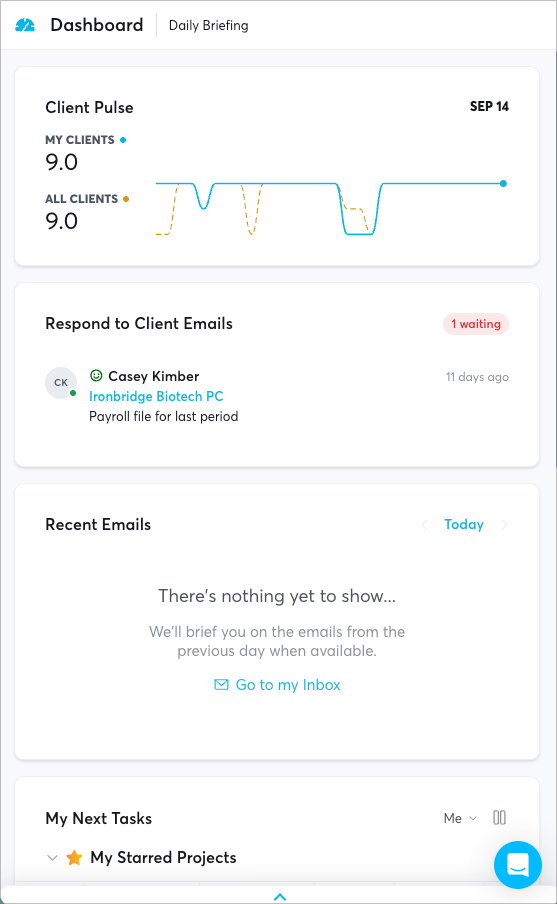
You are not always at your desk. A client calls while you are between meetings, or you want to see where a plan stands before you walk into one.

CX now responds to the size of the screen you are on. Pages reflow for phone and tablet widths, so you can open CX on your phone and work through what you need without pinching, zooming, or scrolling sideways to find a column. Nothing changes on a desktop.

There is nothing to turn on and no separate app to install. Sign in to CX from your phone's browser the way you would from your laptop.

Client status controls for reminders

Reminders can now be scoped to the clients you actually want to reach. Some statuses do not warrant a follow-up, and you can now say so directly.

Open Settings > Reminders and Follow-ups and you will find a Client Status Controls section inside each reminder type. Select the client statuses that should not receive reminders, and the reminder service will skip any client carrying one of those statuses on its next run. Because the setting lives inside each reminder type, you can hold back a data request from terminating plans while still sending signature follow-ups to everyone else.

Improvements

  • Tables: Editable cells now open for editing on a double click, so a single click selects a value without changing it.

Fixes

  • Reports: Resolved an issue where some reports may not be able to be saved or filtered correctly.

September 10th, 2026

CX26 is live in your account today.

This is the largest update to the Client Experience platform since we built it, and you should recognize a lot of it. The tables, the themes, the company page, the census view: those came from what TPAs told us over the past year about how their teams actually work. This release is what that looks like, shipped.

Light, dark, or system. CX now supports both themes. Open your settings and choose the one you prefer, or choose System and CX will follow your device, shifting automatically if your machine changes themes during the day.

Your work, in tables. Projects, tasks, companies, plans, people, and your template library now display in tables. Sort by any column using the arrow in its header. Under More, select Configure Columns to choose exactly which information appears, then drag to reorder and resize. Your layout saves automatically and returns the next time you log in. Many fields can also be edited directly in the row: when you see a blue box around a value, click it and change it without leaving the list. Tables are paginated, so you can set how many records load at a time and keep large books of business fast.

Open records without losing your place. Click the open icon at the left of any row and the record appears in a window on the same page. The detail layout stays close to what you know. For most tasks you will not need to open the record at all, since status can be moved to Doing or Done straight from the table.

Companies and plans, consolidated. A company is now a full page that brings plan data, deal information, interactions, Pulse results, an executive summary, and notes into a single view, with activity and contacts one tab away. Quick actions at the top let you email the primary contact, log a meeting, create or launch a project, add a task, open the client file directory, check payroll connections, or jump into the client portal. Plans follow the same pattern, with plan years, people, data, to-dos, and assets in one place.

A new participants experience. The Census tab replaces Plan Admin and is built around a redesigned participant table. Participants load in a table, cells with issues are highlighted, and hovering over a flagged cell tells you exactly what the issue is. Hover the Issues column to see everything flagged for that participant. Edit a value inline and CX recalculates eligibility immediately. Open a single participant to review deferrals, match, safe harbor, non-elective, profit sharing, loans, distributions, ownership, and custom data in one window.

Nothing was removed and no data or settings changed. The plan sponsor experience in the client portal is unchanged apart from the census collection updates below. Our help center has been updated for the new interface, and refreshed training videos are on the way. If you would like a walkthrough for your team, reach out to your account manager.

Read more

Custom census export formats

You can now build census exports in the format your process actually expects, rather than reshaping a file after every download.

In plan admin settings, open Custom Census Export Formats to create and manage your own export layouts. For each one you can:

  • Name your columns whatever your recordkeeper, auditor, or internal process calls them

  • Map each column to the corresponding Stax.ai value

  • Add hardcoded or blank columns where a downstream system expects a fixed value or an empty field

  • Choose Excel or CSV as the output format

Saved formats appear in the Configure Census Export options under the More menu on the participants page, and can be edited or deleted at any time. Read more

Dashboards and reporting

Dashboards and Reports are now their own destinations in the navigation rather than a selection buried in a dropdown, and they are powered by a native reporting platform built for the way TPAs actually pull numbers.

Build a report by choosing the columns and calculated values you want, then save it for the team. Generate Report is being retired: selecting it now routes you into the new reporting system, where the same output can be built and reused rather than regenerated each time.

Reports are shared at the team level today. If your team wants a walkthrough, we are running a dedicated training session on dashboards and reporting shortly.

Client portal census collection

The census collection experience your plan sponsors see has been updated, and you now control the words on it.

Sponsors are presented with a clearer choice between connecting payroll, which stays the recommended path, and uploading a census or payroll file. If they search for a payroll provider that is not supported, CX now routes them to file upload instead of leaving them stuck. Payroll file uploads carry a requirements checklist the sponsor must acknowledge before dragging in an Excel or CSV file.

On any census data collection task, open Configure Additional Details to write your own instructions for each step: connecting payroll, uploading a payroll file, and uploading a census file. Instructions can reference a specific role on the plan, so a sponsor with a question is pointed at the right consultant by name, email, or title.

A new expression engine

The system that resolves your expressions, the values behind the link icon in emails, automations, templates, and portal forms, has been rebuilt from the ground up. It is faster, evaluates in batches rather than one value at a time, validates as you build, and is far more precise about what it returns.

The most visible change is control. When you link a contact role such as the decision maker or primary plan consultant, click the arrow on the chip and choose exactly what should resolve: their name, their email, their title, or their ID. Lists of records now render as readable lists rather than raw object text, and expressions are validated when you save rather than failing silently at send time.

The result is workflows that do what you designed them to do, consistently and at volume.

Improvements

  • Automations — Project launches now resolve assignees and task data in a single evaluation, so large launches complete faster and more predictably.

  • Client Portal — Form questions and conditions now render in one batch, so portal pages load faster for your plan sponsors.

  • Emails — Bulk sends now render each recipient's content individually, so per contact values resolve correctly across the whole send.

  • Expressions — Lists of records now display as readable values instead of raw object text.

  • Expressions — Expressions are now validated when you save them, with a clear message about what is wrong rather than a silent failure later.

  • Expressions — Contact and user chips now include a property picker so you can choose Name, Email, Title, or ID directly on the chip.

  • Interface — Light mode legibility was tightened across the login page, saved filters, insight cards, and low value states so text and controls stay readable in both themes.

  • Interface — Spacing, scroll bars, button alignment, and placeholder behavior were cleaned up across the library, export templates, questionnaires, and company pages.

  • Projects — Applying a bulk action now refreshes the view so your changes appear immediately.

  • Security — Resolved values are no longer included in evaluation error messages, keeping participant and contact data out of logs.

Fixes

  • Automations — Corrected an issue where launching a project without a project lead could leave every task unassigned.

  • Automations — Fixed a case where unresolved leads or assignees could be saved against an invalid user.

  • Census — Corrected gross compensation calculating incorrectly from payroll dates.

  • Census — Fixed ineligible participants under age 21 displaying eligibility dates and a zero compensation error.

  • Client Portal — Fixed conditional questions using "is set" and "is not set" being hidden from sponsors.

  • Client Portal — Corrected forms returning an empty page when a condition was left blank.

  • Client Portal — Fixed a failure in the client invite flow when a contact role resolved to something other than an email address.

  • Client Portal — Corrected census instructions displaying a stray formatting character.

  • Documents — Fixed folder and file names built from expressions producing incorrect names or saving to the wrong folder.

  • Emails — Corrected bulk send reporting where the audience count was off by one and fully skipped sends were reported as failures.

  • Expressions — Removed a leading equals sign that appeared on evaluated values.

  • Files — Fixed selecting Move after a bulk file selection moving only one file.

  • Forms — Corrected variables rendering incorrectly in the Show When question selection.

  • Forms — Fixed autofill and saved response restore not working in the form filler.

  • Forms — Corrected View Results in the library displaying in a condensed layout.

  • Forms — Fixed the Link to Fields formatting on fillable PDFs.

  • Inbox — Resolved duplicate disconnected banners appearing at the same time.

  • Participants — Fixed the participant page displaying stale issues after a manual override.

  • People — Corrected adding a new phone number on an open contact not saving.

  • People — Fixed Cancel doing nothing in bulk actions on the Employers and Deals tabs.

  • Plans — Fixed the default plan year resource view not auto-populating.

  • Projects — Corrected starred projects not displaying a star.

  • Settings — Fixed the default value input clearing while typing when creating or editing custom fields.

  • To Do — Corrected new tasks duplicating and then disappearing.

  • To Do — Fixed bulk actions overlapping the statistics on the Attention view.

September 3rd, 2026

CX Platform

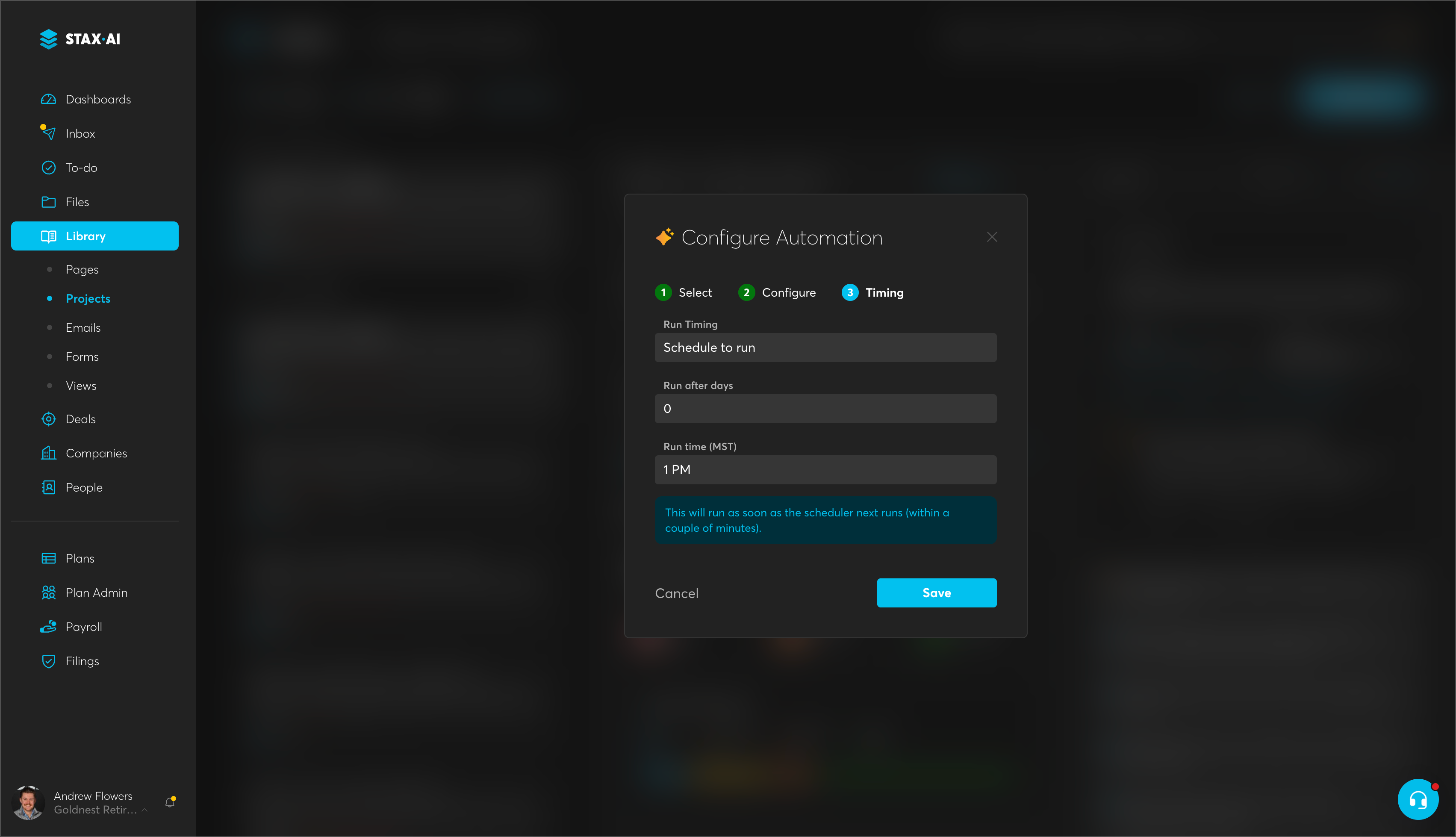
Until now, an automation fired the moment the task before it was marked done. That works when the next step really should happen immediately, but plenty of work doesn't: an email that should go out three days after a census request, a follow-up that belongs at 9am rather than whenever someone happened to close the prior task at 6pm.

Automation configuration now has a third step for timing. Choose Run immediately to keep the behavior you have today, or choose Schedule run and set how many days to wait and what time of day it should fire. Zero days is allowed, so you can hold an automation until a specific hour on the same day. Once the prior task is completed, the automation waits instead of launching, and a badge on the task shows when it's scheduled to run.

Scheduled automations run once at their configured time and won't re-fire the next day. You'll find the timing step in any automation configuration under Library > Projects.

Fixes

  • Dashboards: Fixed a case where a task existed and worked correctly inside its project but never appeared on the dashboard, caused by a stale pointer to the project's next task.

  • Form 5500: Signing a 5500 with a name that carried a leading or trailing space caused the signature to fail. Signature values are now trimmed before submission, and the validate button no longer falls out of sync.

  • Form 5500: Corrected extra white space around the PDF viewer and its borders on the drafting page.

  • Files: We’ve resolved an issue where shared and company directory file templates would pull in the root folder, instead of the nested contents.

  • Participants: Fixed participant card loading in the side menu, which behaved differently from the card in the main panel.

  • Plan Provisions: Corrected a misspelling of "Selected Accounts" under In-service Withdrawals > Hardship > Allowable Hardship Withdrawal Accounts.

August 26th, 2026

CX Platform

When you send a billing notice or a document request from your own domain, the only outcome that matters is that it lands in the sponsor's inbox. Whether it does comes down to how your domain is authenticated — something that's easy to get subtly wrong and hard to notice until a client tells you they never got the email.

Stax.ai now confirms that for you. When you connect a sending domain, we check its DMARC and DKIM records and hold the domain inactive until both are in place. Once they check out, the domain is marked active and becomes available for bulk sending, so everything you send from it is authenticated the way receiving mail servers expect.

You'll find domain setup in Settings under Domains. Read more about Bulk Email Here.

Safeguards on project launches

Project launches now claim their work before they run, so one submission produces one set of projects and one set of emails.

If the same launch is submitted while another is still in flight, Stax.ai rejects the duplicate with a clear message instead of queuing it behind the first. A retried automation task resumes the run it already has rather than starting a second one. And when a launch can't be dispatched, the automation log records the actual reason, so there's something to act on.

The Missed Automation view now shows how much time is left on a retry that's still inside its window — enough to tell at a glance whether to wait it out or step in.

These safeguards are on for every team; there's nothing to enable.

Improvements

  • Navigation — The folders section in the sidebar is tidier: with no folders yet you'll simply see + New folder, and folder items now line up cleanly with the sub-pages above them.

Fixes

  • Automations — Saving a questionnaire to a client's directory could create a duplicate file or a duplicate year folder; each save now writes a single file to the correct folder.

  • Companies — A company's address panel could only be closed by saving it, and in some cases the address carried into the next company record you opened. You can now open, review, and close an address without changing anything.

August 21st, 2026

CX Platform

Firms standardized on Entra ID, Okta, or Google Workspace have had to manage a second set of Stax.ai credentials — separate passwords, separate off-boarding, and no way to apply their own access policies to the platform.

Stax.ai now supports SAML 2.0 single sign-on. An admin connects your identity provider once from your organization's settings, either by uploading its metadata file, pointing at a metadata URL, or entering the details by hand. From then on your team signs in through your provider, and the access rules you already enforce there apply to Stax.ai too. Both directions work: starting from Stax.ai, or launching Stax.ai from your provider's app portal.

By default, a person must already be invited to your organization before they can sign in through SSO, so no one arrives unexpectedly. If you'd rather have accounts created on first sign-in, that can be enabled for your organization. Password sign-in continues to work exactly as before for anyone not on SSO.

SSO is rolling out to organizations now — talk to your account manager to get it turned on and configured.

Automatic user provisioning and de-provisioning

Single sign-on controls how people sign in. Directory sync controls who exists in the first place.

Stax.ai now supports SCIM 2.0, so your identity provider can create, update, and deactivate Stax.ai users automatically. When someone joins, their account is created with the right details. When their role changes, it updates. When they leave your firm, their Stax.ai access is revoked with them — no ticket, no manual cleanup, no dormant accounts left open.

Groups sync as well, and map to Stax.ai groups so permissions follow directly from your directory. Groups that originate in your provider stay owned by your provider for naming and membership, while your Stax.ai admins keep control of the settings on them.

Setup uses a dedicated provisioning token generated from your integration settings, separate from anyone's login. Available alongside SSO — your account manager can enable both together.

Stop a bulk send before it goes out incomplete

Some mailings you can't afford to get partly right. Bulk email send settings now include a new option beneath the recipient fields: Stop the send if any recipient can't be evaluated.

Turn it on and Stax.ai builds every message before sending any of them. If even one recipient can't be resolved, nothing goes out, the full list of problem recipients is recorded for you to review, and you're notified. It's off by default, so existing and scheduled sends behave exactly as they do today.

Copy Variables automation now works with plan years

The Copy Variables automation can now use a plan year as its source or its destination, alongside the project types it already supported.

Pick Plan Year in the automation's source or destination configuration and Stax.ai will find the matching plan year project and copy the variable across. If you've set a plan year as the destination and that plan year project doesn't exist yet, Stax.ai creates it for you rather than failing the run.

You'll find the new option in Automation Config wherever you set the source and destination.

Improvements

  • Email — The inbox composer now preserves the formatting of HTML templates instead of stripping it.

  • Milestones — Plan Data columns on plan-year reports now sort, so related fields stay grouped as you scan a report.

  • Reminders — Reminder schedules can no longer be saved with a follow-up interval of zero, which previously caused a schedule to behave unpredictably.

  • Reminders — Reminder runs complete noticeably faster on large client lists.

Fixes

  • Automations — Automated email tasks no longer stall when a workflow resolves an internal Plan Manager contact; those tasks now complete and send as configured.

  • Automations — The Save a Project File automation was writing to a duplicate client directory instead of the one linked to the client; files now land in the directory set on the automation.

  • Bulk Email — A send with more than one recipient option required every option to resolve, so recipients who matched only one were skipped as "Missing To field"; a recipient now sends as long as at least one option resolves, and an interrupted send no longer delivers a second copy.

  • Data Fields — Selecting an existing data field could display a different field than the one chosen; the correct field is now shown.

  • To Do — The status filter's "exclude" option had no effect on the projects list; excluded statuses are now correctly filtered out.

August 13th, 2026

CX Platform

Client reminders have always gone out on their own schedule, which is the right default — until the moment you need them to go out now. Chasing an outstanding task before a deadline meant either waiting for the next automated run or sending each reminder by hand.

You can now trigger a run yourself. Open the reminders settings page and choose Run Reminders. Stax.ai re-processes every eligible reminder for your organization and sends it, using exactly the same rules as the automated run — just on your timing. Because it sends real email to real clients, the action is behind a two-step confirmation, and you'll see a clear error if the run can't be started rather than a false success.

We also fixed the underlying reason some reminders quietly stopped arriving: when a task was flagged, it stayed excluded from reminders permanently. Updating a task's follow-up date now clears that flag, so the task re-enters the reminder cycle as you'd expect.

Run Reminders is available now on the reminders settings page.

Form 5500 download enforcement

Plan sponsors sign the Form 5500 in the client portal, and we want them reading it before they do. The signing task now requires a download first: the User ID, PIN, and Name fields stay disabled with a message explaining that the form must be downloaded, and unlock as soon as it has been. It applies automatically to Form 5500 signing tasks — nothing to configure.

Improvements:

  • Government Filings — Line breaks are now stripped automatically from Form 5500 entries, so values submit cleanly without manual cleanup.

  • Government Filings — The link from a filing back to its client record is easier to find.

Fixes:

  • Client Portals — Questionnaire answers mapped to client and plan fields are no longer dropped when the form launches a project.

  • Documents — Shared folder templates now prevent selecting a directory that would nest inside itself, so a template can no longer generate runaway folders.

  • Email — Template greetings no longer render a blank name and a dangling comma when one of the addressed contact roles is unassigned.

  • Email — Resolved an issue where loaded templates would strip formatting in the email composer.

  • Government Filings — Autofill now completes schedules and additional pages, not just the main form.

  • Government Filings — The filings count now matches the filings shown in the list.

  • Government Filings — Resolved an issue that caused Government Filings to load intermittently.

August 4th, 2026

CX Platform

The answer to most client questions is in an email thread — usually one from four weeks ago, behind a thousand other messages. Email 2.0 connects your mailbox to Stax.ai so the conversation lives with the client it's about: thread history sits next to the plan, the tasks, and the documents; you write knowing what's still outstanding; and those conversations feed Client Pulse, so how an account is trending reflects what's being said, not just what's been checked off.

It's all on a new foundation — near-real-time sync for Gmail and Outlook, threads that hold together, and the inbox views you work out of, with everything you already use carried forward. On top of that, CX adds an assistant that drafts with your client context in hand, folders and labels that mirror your mailbox, and a bulk email system that sends from your own domain.

Update On Your Time: The next time your mailbox disconnects, reconnecting will take you through our new email connection flow. Or to connect right away, open your settings, disconnect your mailbox, and reconnect it.

An AI assistant inside your inbox

The new email assistant does more than autocomplete. It writes and adjusts your message for you — drafts a reply from scratch, tightens what you've written, changes the tone — and it answers questions using the context Stax.ai already holds about the client in front of you.

Ask it about a client, a thread, or what's still open on a plan:

  • Write and revise — draft a reply, rework a paragraph, adjust the tone of what you've written

  • Ask about a client — pull what Stax.ai knows about the company, plan, and contacts without leaving the message

  • Catch up on a thread — get the through-line of a long conversation before you answer

  • Check outstanding work — see which tasks are still open for that client so your reply reflects where things actually stand

You'll find the assistant in the compose window and alongside any open thread.

Folders and labels

You can now create and manage folders and labels directly in Stax.ai, matching however your mailbox already works — labels if you're on Gmail, folders if you're on Outlook. Organize client mail the way you organize everything else, and the structure stays consistent between Stax.ai and your mailbox.

A new bulk email system

Bulk email has been rebuilt around your own sending domain. You can configure the mail delivery records for a domain you own, so campaigns send as you rather than on a shared sender — which protects your sender reputation and gets more of your mail into inboxes.

The new system adds:

  • Deliverability reporting — see how a campaign actually performed on delivery, not just that it was sent

  • Multi-domain support — configure more than one sending domain and choose which one a campaign goes out from

  • Open tracking — see who opened a bulk campaign

You can also send bulk email from a saved template.

Domain setup lives in Settings and will appear in your account within 48 hours. If you choose not to connect your domain, you can still send bulk emails through your connected inbox, however certain deliverability and open insights reporting may be limited.

Mark emails as private

Not every message in a connected mailbox belongs to the whole organization. You can now keep email to yourself two ways:

  • A blanket privacy rule — applies to everything synced from your mailbox

  • Per message — use Mark as private on any individual email

Private emails are excluded from organizational visibility, so the rest of your team won't see them in shared views.

Two clear ways to approve a census

The Verify Census File task in the client portal now supports both ways a plan sponsor actually works through a census.

If a sponsor downloads the census and uploads a corrected version, Approve moves them straight through. If they review it and have no changes to make, Approve asks them to confirm they're approving the census as-is, then completes the task.

Improvements

  • Email — You can disconnect a mailbox from Settings at any time; new mail stops syncing and everything already synced stays accessible.

  • Email — The compose toolbar is cleaner: AI tools stay disabled with a tooltip until you select text, inserting a template no longer brings stray formatting with it, and the inline editor dropped its redundant toolbar.

  • Email — Refreshed icons throughout the inbox.

  • Government Filings — Prior-year data for the 2024 Form 5500 is now in place, so prior-year figures carry forward on the filings you're preparing.

Fixes

  • Automations — The Create or Update Contact automation now ties a new contact to the correct plan and deal.

  • Automations — Create or Update Contact now creates a new contact when the email address is new instead of overwriting an existing record, and maps name, phone, role type, and internal-vs-external correctly.

  • Automations — Fixed a failure where launching a project couldn't create its deal because the funnel and stage couldn't be resolved.

  • Automations — Document auto-populate no longer fails on .docx templates, so the populated file is produced and can be converted to PDF.

  • Client Portals — Corrected an invite issue where a new portal user couldn't log in and a password reset reported the account didn't exist.

  • Client Portals — The outstanding-task reminder email option now appears only when there is actually a client task waiting in the portal.

  • Email — Bulk sends no longer stall when a recipient role resolves to no one; the message still goes out to everyone else on the list.

  • Email — Reminder emails no longer fail silently; sends land in your sent box as expected.

  • Email — Fixed thread grouping so replies stay attached to the original conversation.

  • Government Filings — Launching a filing no longer errors out when the client record can't be resolved.

  • Government Filings — The amendment toggle on filing launch now saves the setting you choose.

  • Government Filings — Corrected a case where a 5500 submission reported success while the filing stayed in Drafting; filing status now advances to Submitted as expected.

  • Platform — Refreshing a page no longer returns an intermittent 404.

  • Reporting — Milestone reports now list every plan status as a selectable option, including Terminating and Terminated.

  • To-Do Queues — Queues no longer break when the project lead sits in a different queue than the task assignees.

July 23rd, 2026

CX Platform

Filing season doesn't wait, and neither should the forms. Preparing a prior-year 5500 outside the platform means juggling separate tools and re-keying data you already have in Stax.ai.

Government Filings now supports the complete 2024 form year, including all associated schedules, so you can prepare and submit prior year 5500 and amended 5500 filings directly in Stax.ai. Transmission and filing certifications for the new form year are in place, so your filings go out through the same reliable path you already use. When submitting an amended filing, CX will also now ask you to enter in your ACK reference number, to easily track which filing is being amended, even if you didn’t file originally in CX.

You'll see the 2024 forms when you start a new filing in the Government Filings module.

Automatic Shared Directory setup for new companies

Setting up a new company used to mean building out its Shared Directory folder structure by hand every time — repetitive work, and easy to end up with inconsistent folders across clients. Now, when a new company is created, Stax.ai generates the full Shared Directory folder tree automatically from a default structure you define in advanced settings. New clients start with a clean, consistent Shared Directory from day one, with no manual setup.

Stronger account security

We’re continuing to roll out security enhancements across Stax.ai to better protect your firm's and your clients' data. This includes multi-factor authentication (MFA) for staff accounts and added protection for logins from unfamiliar locations, with firm-level controls for administrators.

These upgrades are rolling out to firms over time. Staff MFA is available in your settings, and administrators can set requirements for their team from the security section of team settings.

Multi-factor authentication for your Client Portal

Your clients' logins deserve the same protection as your team's. Client Portal users can now enroll in multi-factor authentication, and TPAs can require it — so plan sponsors and participants must secure their accounts with a second factor to sign in. That gives you a consistent security standard across everyone who touches your clients' data, not just your own staff.

Client Portal MFA is rolling out to firms over time. If you'd like it enabled for your clients, reach out to your account manager.

Improvements

  • Reminders — Client invite reminder settings are now clearer, with plain-language descriptions and the removal of an unused option, so it's easier to see exactly what each reminder does.

Fixes

  • Automations — Resolved an issue where the "Create a Company" automation could run multiple times and create duplicate companies.

  • Census — Fixed a case where an additional census file failed to import after payroll data had already been imported.

  • Census — Corrected inconsistent field flagging during census review so that union employment types and related fields surface and carry through correctly.

  • People — Fixed bulk tag additions that could cause the page to hang or become unresponsive on large contact lists.

  • Plan Year Data — Resolved an issue that prevented selecting a view on the plan year data page.

  • Tasks — The required-data modal now correctly rejects text in number fields, so invalid values can no longer be submitted.

July 17th, 2026

CX Platform

Client reminders are now more precise about who they reach and who they come from. Reminders only go out for tasks that are actually past due, and you can choose which contact roles receive them and which role they're sent from — so clients hear from a real, configured contact instead of a generic system address.

Set your sender and recipient roles in Reminders and Notification settings.

Multipage support for Government Filings

Some 5500 filings need more line items than a single form page can hold — a Schedule C with a long list of service providers, or a Schedule I with dozens of plan assets, for example. Until now, Government Filings forms and schedules were limited to what fit on one page, which meant extra manual work to get a large filing into shape.

Now, any form or schedule that runs long automatically flows onto continuation pages — no manual splitting required. Validation and data population have been updated to handle these additional pages correctly, so nothing gets missed or duplicated when a filing spans more than one page.

This is live now for Government Filings pilot teams preparing 5500 series filings.

Improvements

  • Government Filings — Signer pages now show the plan's relevant contacts, making it easier to confirm the right person is signing.

  • Government Filings — Removed a redundant toggle from the signer flow, simplifying how you assign signers.

Fixes

  • Automations — Fixed an issue where the Create Company automation could save a raw field reference instead of the actual company name value.

  • Data — Fixed an issue where data fields could revert to older values, fail to display until clicked into, or hide their data when the field was renamed.

  • Government Filings — Fixed an issue where certain export formatting and checkbox fields didn't render correctly.

  • Government Filings — Resolved an issue that prevented reordering tasks within a filing project.

  • Government Filings — Corrected plan characteristic codes that could populate incorrectly on a filing.

  • Government Filings — Fixed an automation issue that could interrupt launching a new filing project.

  • Government Filings — A filing's status can no longer change after submission, except when it's approved or rejected.

  • Government Filings — Fixed a case where a filing's status could revert to draft unexpectedly.

  • Government Filings — Fixed an issue where form validation could misfire on continuation pages added to a filing.

  • Government Filings — Corrected submission field values on certain 5500 schedule templates.